
A short story of Content Spoofing to HTML Injection in Apple using Dangling Markup Injection

Content Spoofing is an injection in which user input is reflected as it is in the application response which can be used in phishing attacks.

During the recon phase, I found itunesconnect.apple.com, a subdomain of apple and after digging into it, I had observed that the content of the error key parameter was reflecting back to the page as shown below
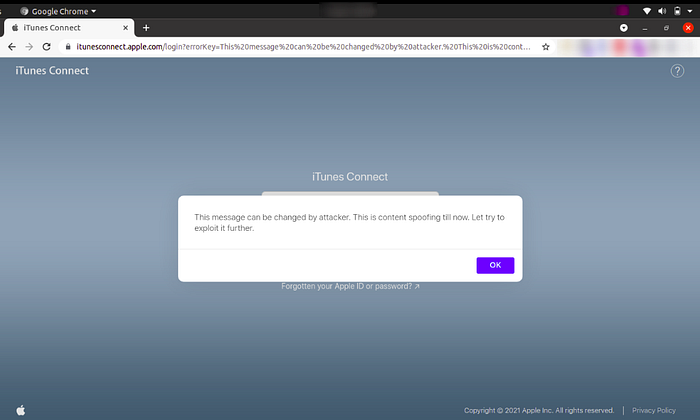
Payload - https://itunesconnect.apple.com/login?errorKey=This%20message%20can%20be%20changed%20by%20attacker.%20This%20is%20content%20spoofing%20till%20now.%20Let%20try%20to%20exploit%20it%20further.


With normal inline Cross-Site Scripting(XSS) payloads, the application was giving a blank pop-up. After trying different scenarios, I have observed that dangling markup injection is possible on the vulnerable parameters (errorKey)

Let’s understand the concept of Dangling Markup Injection

Dangling markup injection is very useful where we can’t find a way to execute our JavaScript due to input filters, content security policy, or other obstacles payloads but we can inject some HTML tags. It is used to steal the contents of the page without script by using resources such as images to send the data to a remote location that an attacker controls.

For our exploitation, I had used CSS @import as a payload. The main purpose of the @import method is to use multiple style sheets on a page.
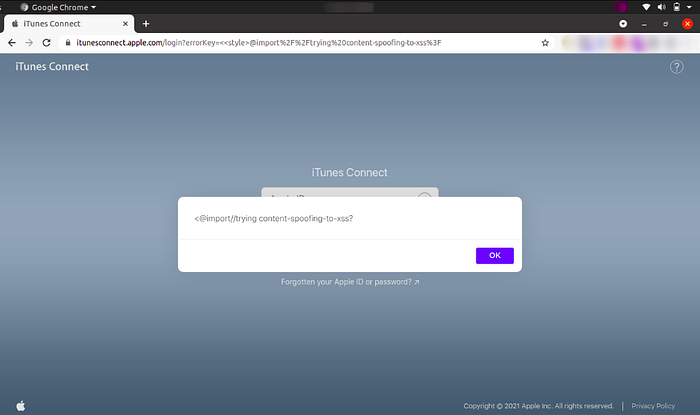

Time for the final payload to have a broken image linked to itunesconnect.apple.com itself which led to HTML injection.
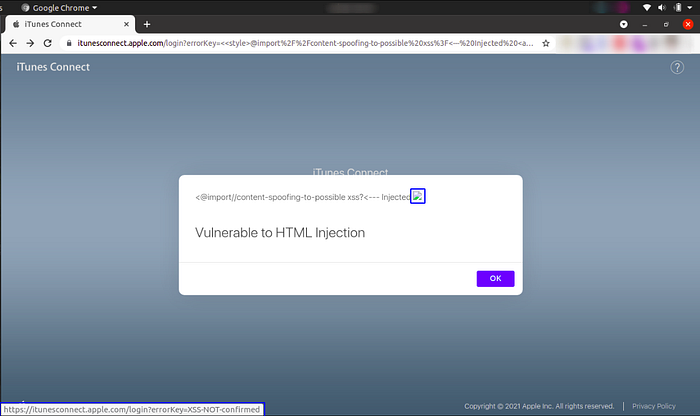
Payload - https://itunesconnect.apple.com/login?errorKey=%3C%3Cstyle%3E@import%2F%2Fcontent-spoofing-to-possible%20xss%3F%3C---%20Injected%20%3Ca%20href%3Dhttps:%2F%2Fitunesconnect.apple.com%2Flogin%3FerrorKey%3DXSS-NOT-confirmed%3E%3Cimg%20src%3D%22https:%2F%2Fbitenapple.com%2Fmytest.jpeg%22%3E%3C%2Fa%3E%3C%2Fbr%3E%3C%2Fbr%3E%3C%2Fbr%3E%3Ch1%3EVulnerable%20to%20HTML%20Injection%3C%2Fh1%3E


 Reference:

https://rishuranjanofficial.medium.com/?p=3f8a898f21ee

Comments

Security blog of the month

JWTweak v2.1 – A Guided, Offline Toolkit for Modern JWT Attacks

Introduction JSON Web Tokens sit at the heart of modern authentication – and because the token travels in the user’s hands, a single weak check on the server side can hand an attacker an admin account. JWTweak was built to test for exactly these flaws. It started as a small utility to switch a token’s algorithm and re-issue it in seconds, helping security enthusiasts hunt for issues like the JWT Algorithm Confusion Attack. Version 2.1 is a complete rewrite into a guided, menu-driven toolkit: you paste a token, it decodes and risk-analyses it, recommends the attacks that fit, and walks you through each one – entirely offline, with no flags to memorise. In this post we’ll tour the tool and then break into a deliberately vulnerable app with two live proof-of-concept attacks.